Built for nurseries & preschools

The complete, one‑stop staff admin tool for your setting.

Attendance, leave, DBS renewals and Ofsted-ready records — all managed in one up-to-date space, so you can ditch the spreadsheets, the WhatsApp chats and the paper files for good.

UK-hosted, one database per nursery Onboarding and support included in every plan Now taking early nurseries for Q2 2027
app.firststepshr.co.uk
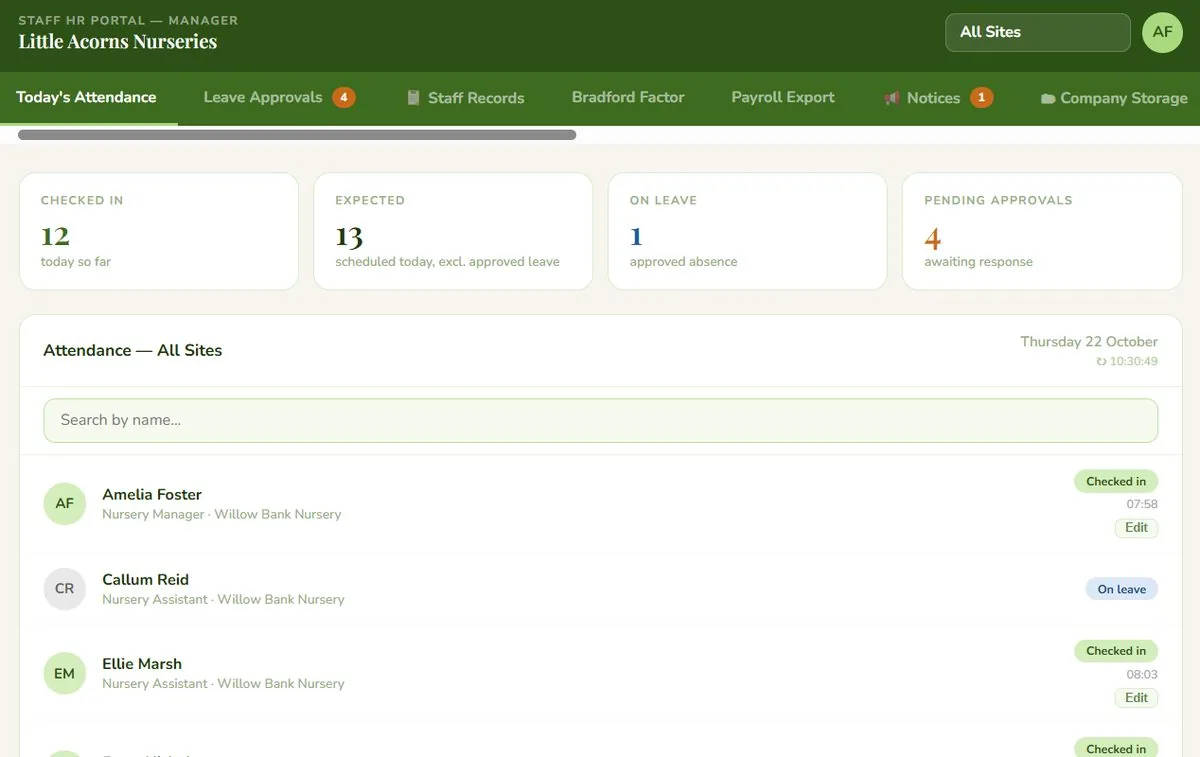
First Steps HR manager dashboard, showing today's attendance across two nursery sites with 12 staff checked in

Real screenshot from the First Steps HR demo environment — sample data, not a live client account.

Does this look familiar? Most nurseries run this way.

Not due to a lack of care, but because no one invented a better, more joined-up way… until now!

staff group, 7:41amSorry running late, traffic on the A2 🙈
manager, 8:15amCan someone check if Jane's DBS is due? Think it's this month
deputy, 3:02pmWe're short this afternoon, who's actually in?
manager, day before OfstedWhere's the qualifications folder gone
Check-in happens on arrival — no group chat needed
Renewal alerts land 60, 30 and 7 days before they're due
See who's actually on site the moment they check in, matched against their working pattern
Every record structured the way an inspector expects

Everything a manager checks before 9am

One secure system for your whole setting: leave, attendance, contracts and records, digitised and stored in one place, not scattered across spreadsheets and filing cabinets.

Leave that understands term-time

One calendar for term-time and full-time staff.

  • Term-time and full-time staff in the same calendar
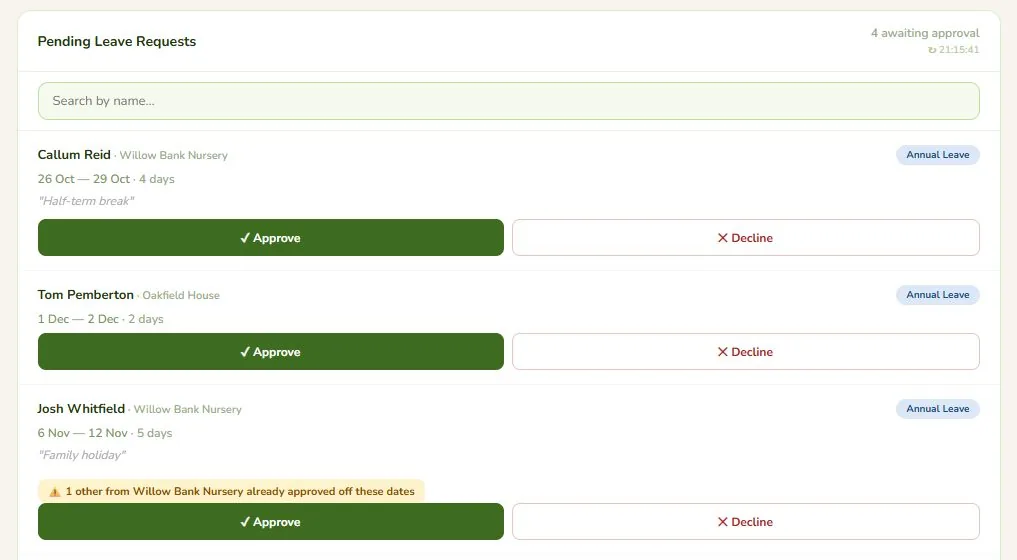
  • Overlaps flagged before they become a cover problem
  • Holiday rollover runs itself at year end
  • Requests and approvals in one flow, with email notifications
Leave approvals screen, showing pending leave requests, with a warning that another colleague from the same site is already approved off

Compliance records, always inspection-ready

Everything an inspector asks for, in one place.

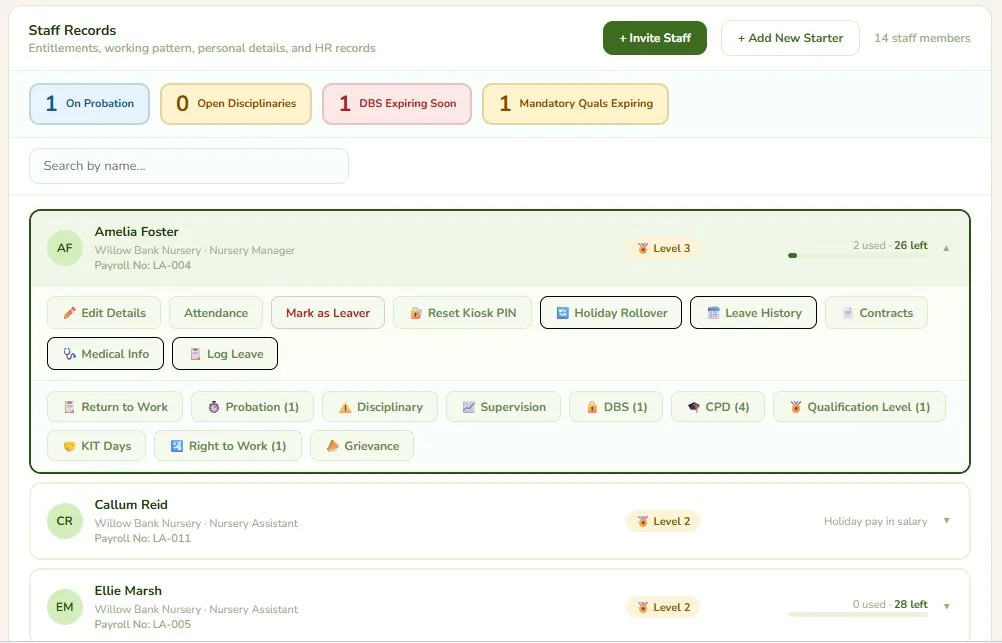
  • DBS numbers
  • Qualification levels
  • CPD dates
  • All available any time
  • Always in sync — no separately-updated fields to fall out of step
Staff Records screen expanded for one staff member, showing HR record shortcuts including Contracts, DBS, Qualification Level and CPD

Every staff contract, in one place

Know where every contract stands the moment you open the tab.

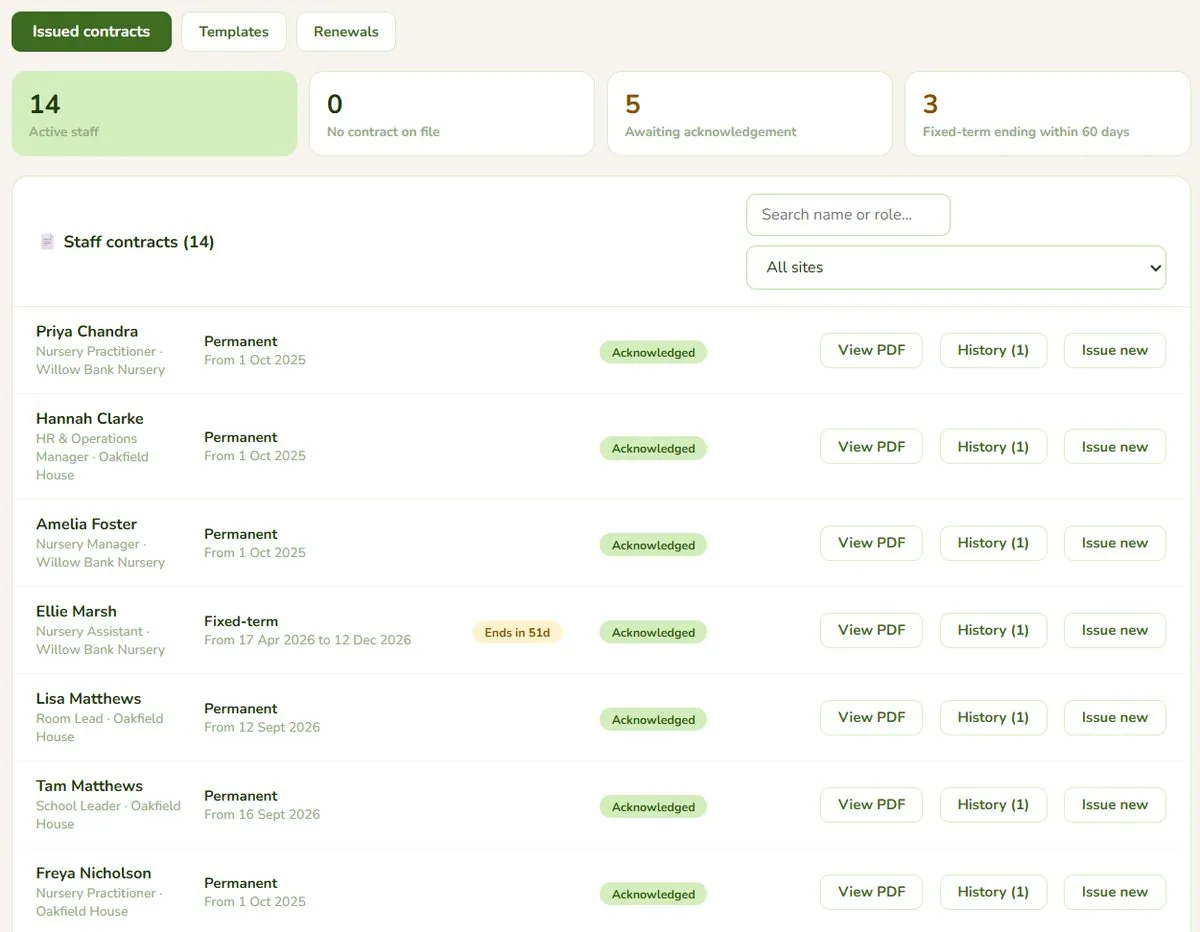
  • Who has a contract on file, at a glance
  • Who still has to acknowledge theirs
  • Fixed-term contracts ending in the next 60 days
  • Any contract as a PDF, plus each person's full history
  • Every time HR opens someone else's contract, it's recorded in the audit log
Contracts screen, listing every active staff member with their current contract, its status, and View PDF, History and Issue new buttons

Renew a whole team in one go

From a list of who's due, to a PDF contract for each person.

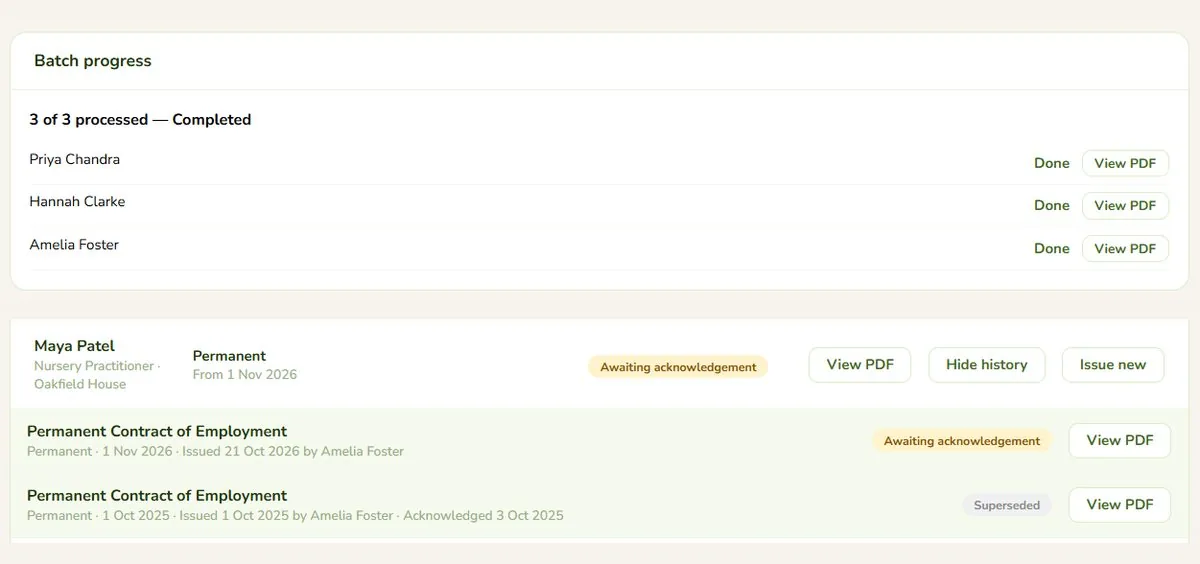
  • Pick everyone due a renewal, choose a template and an effective date
  • Add a percentage or flat pay increase, if there is one
  • A PDF generated for each person, with a live progress view
  • Staff acknowledge it in their own documents
  • Every renewal kept in their history
Bulk renewal progress showing three contracts completed with View PDF buttons, above a staff member's contract history showing a superseded contract

Contract wording that's yours

Your own contract wording, filled in automatically.

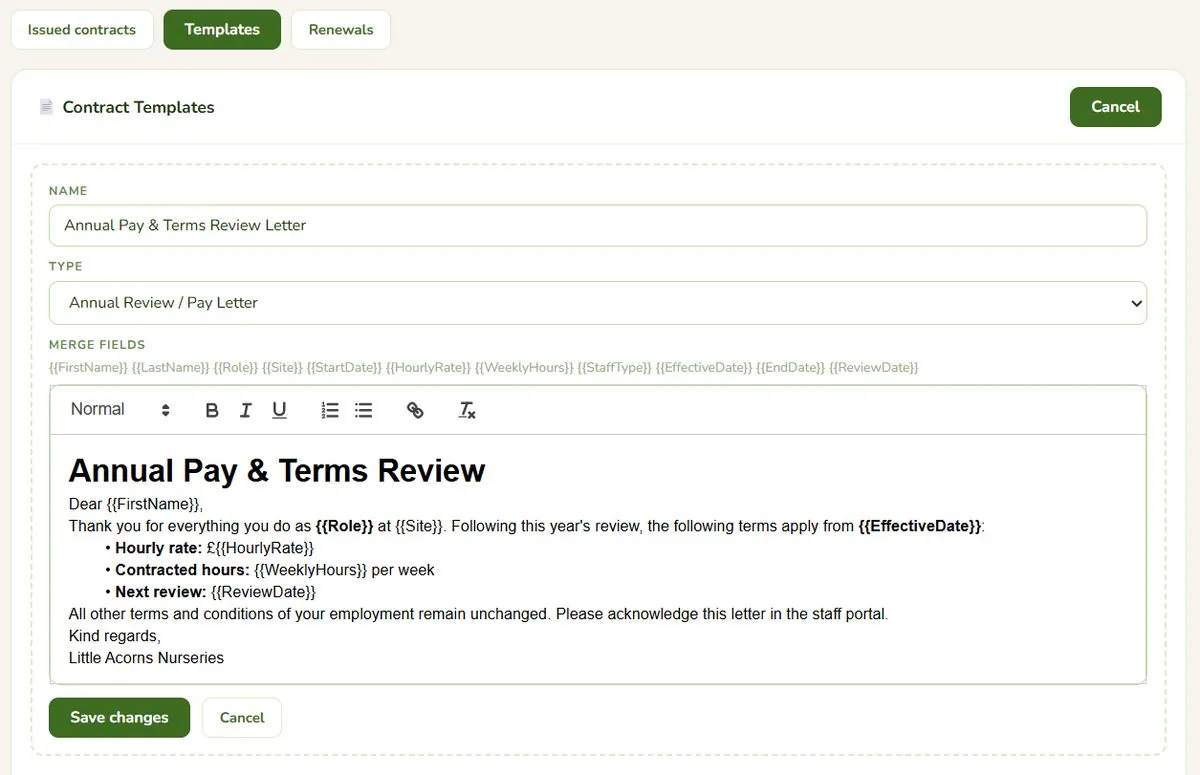
  • Permanent, fixed-term and annual pay review templates
  • Merge fields for name, role, site, hourly rate, weekly hours and dates
  • Each contract fills itself in from the staff record
  • Edit the wording yourself, any time
Contract template editor, showing an annual pay and terms review letter with merge fields such as FirstName, Role, HourlyRate and EffectiveDate

Payroll-ready, not payroll-guesswork

Month-end payroll without the detective work.

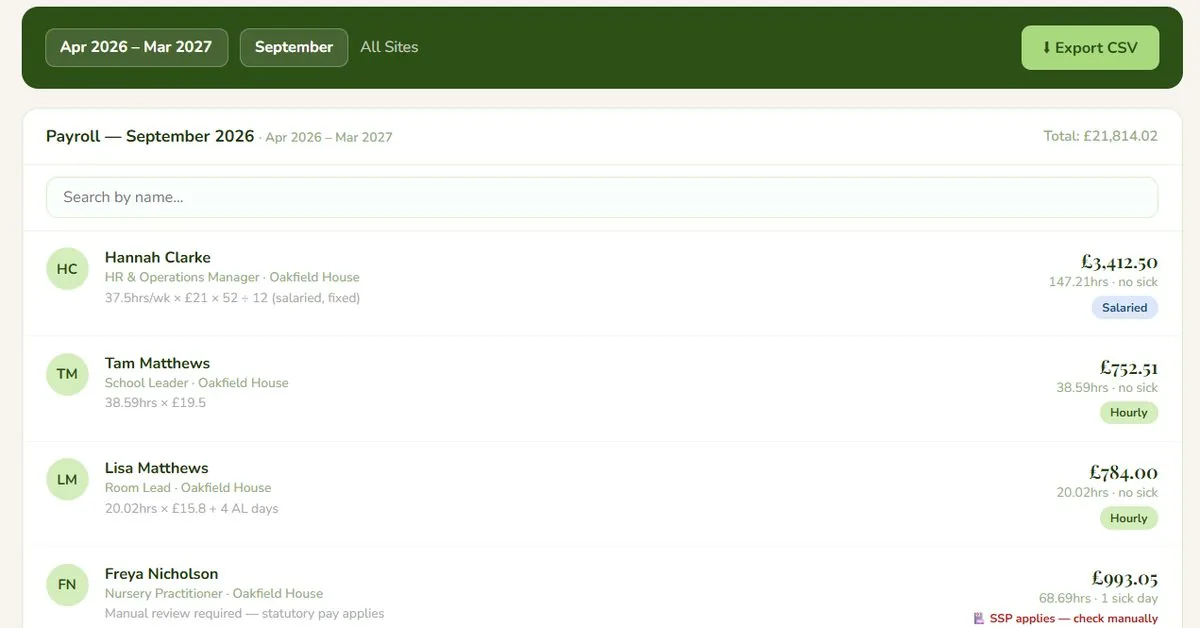
  • Hours, leave and pay-affecting changes in one export
  • In a format your payroll provider can actually use
  • Sick and closure days already accounted for
  • Flags where statutory pay needs a manual check
Payroll export screen for September, showing hours, sick days and staff type for every member of staff, ready to export

One login, every site

Run one setting or six from the same place.

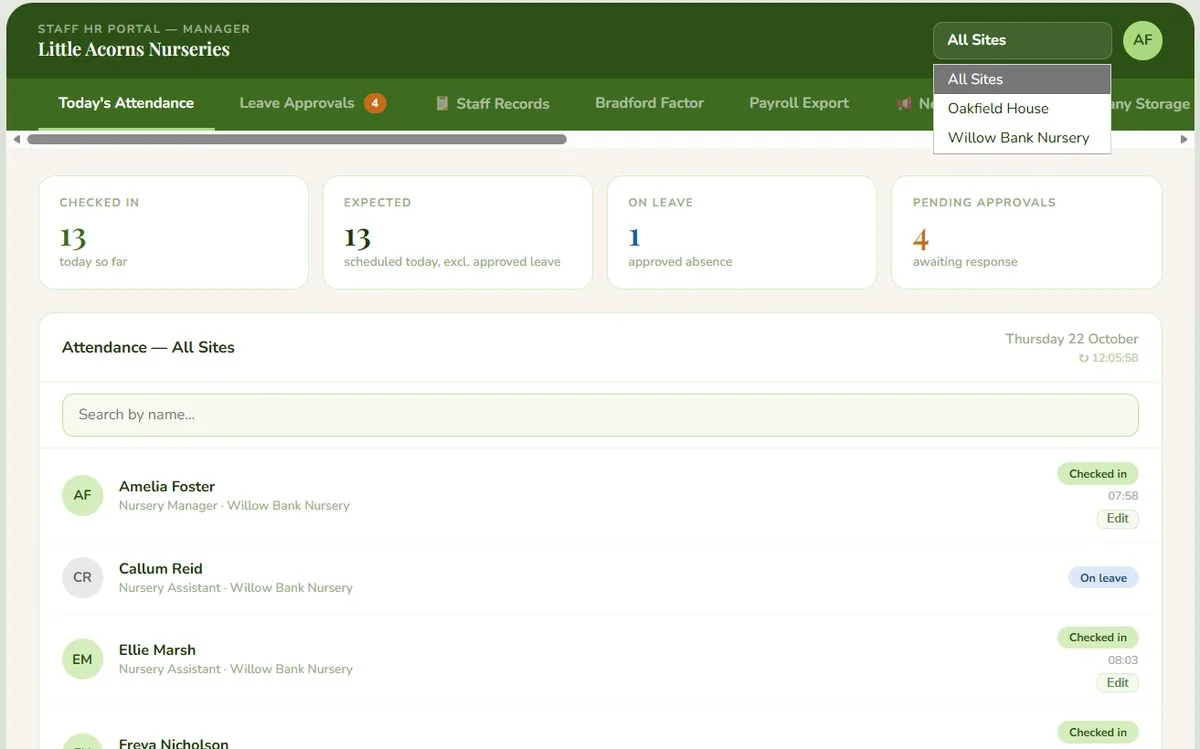
  • One login, every site
  • Managers see their own site; HR sees everything
  • Deputy cover is time-boxed automatically, not left as a permanent role change
Today's attendance with the site selector open, listing All Sites, Oakfield House and Willow Bank Nursery

A week's attendance, at a glance

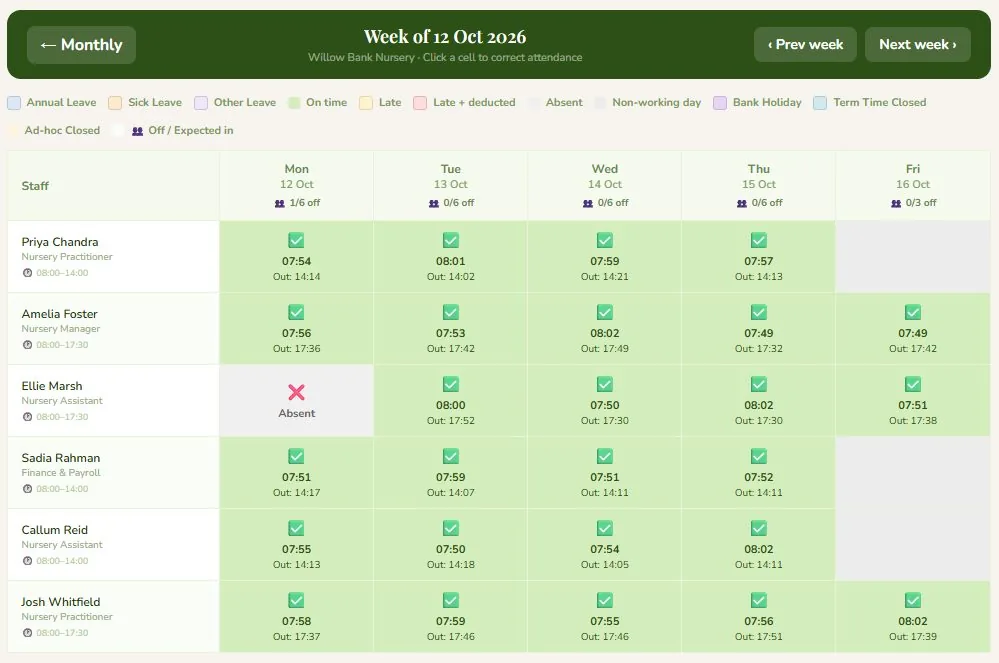
Every check-in and check-out, laid out by the week.

  • Every check-in and check-out time, for every member of staff
  • See who's in, who's late and who's missing — without chasing anyone
  • Nothing reconstructed from memory at 5pm on a Friday
Weekly attendance view, showing check-in and check-out times for every staff member across the week

One dashboard, every metric that matters

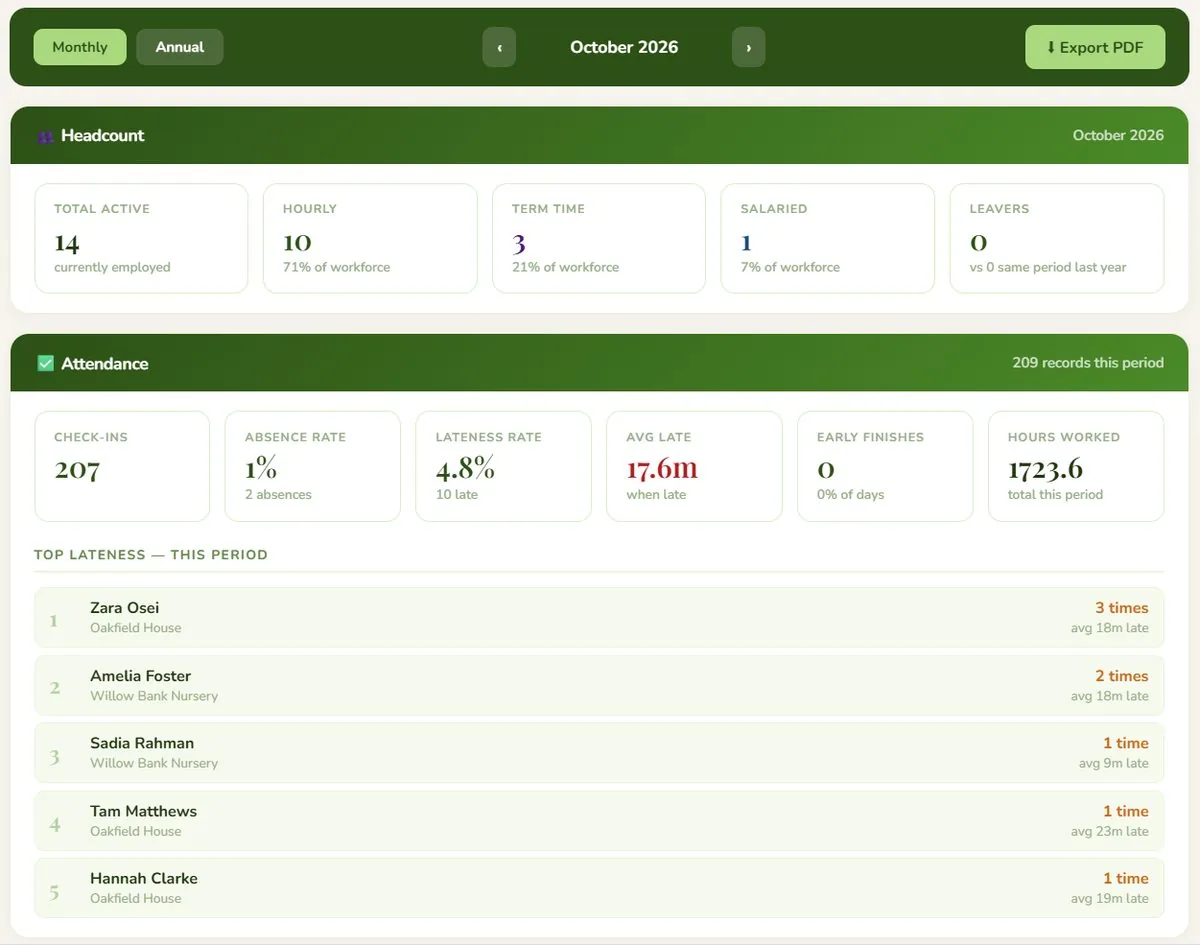
The numbers behind a board meeting or an Ofsted visit.

  • Headcount, attendance and absence in one place
  • Lateness and hours worked, month by month
  • Pulled together automatically, not rebuilt in a spreadsheet every month
Reports dashboard, showing headcount, attendance, absence rate and lateness for the month

Absence patterns, caught early

A real pattern, spotted before it's obvious day to day.

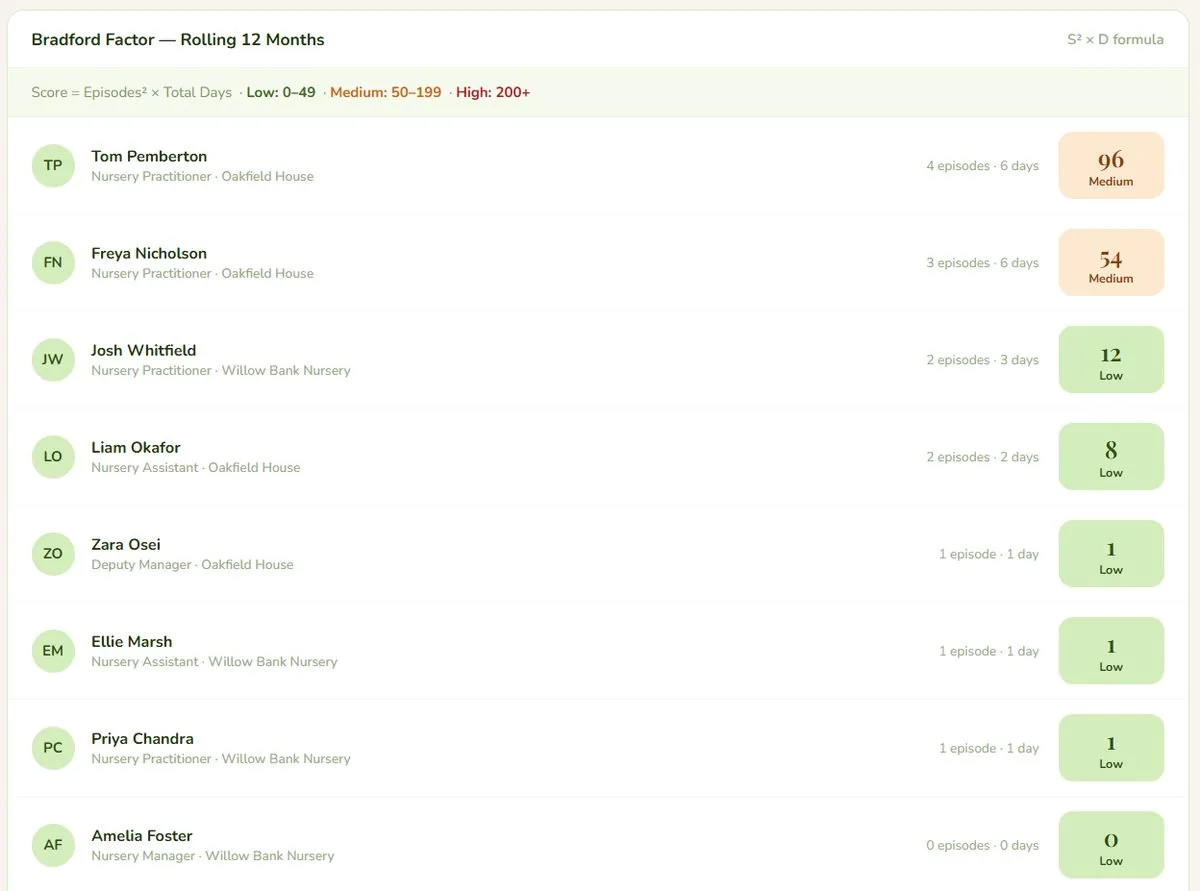
  • Bradford Factor calculated automatically for every member of staff
  • Rolling over 12 months
  • Clear low, medium and high bands
Bradford Factor screen, showing a rolling 12-month risk score for every staff member

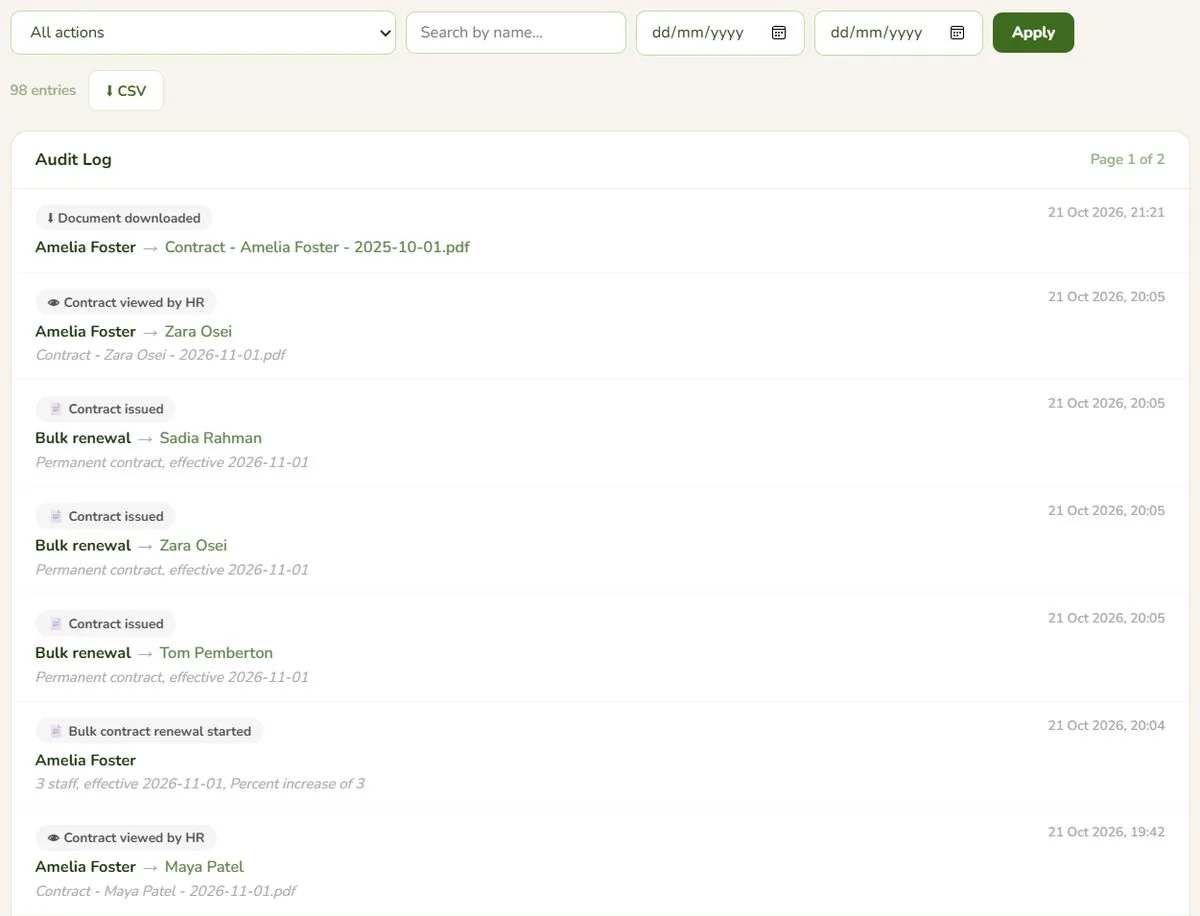
A full audit trail, automatically

Nothing to reconstruct after the fact.

  • Every change logged — hourly rate, working pattern, site, payroll number
  • Who changed it, and when
  • The before-and-after values
  • Contracts issued, viewed and renewed are recorded too
Audit log screen, showing a timestamped history of who did what, including contracts issued, viewed and renewed

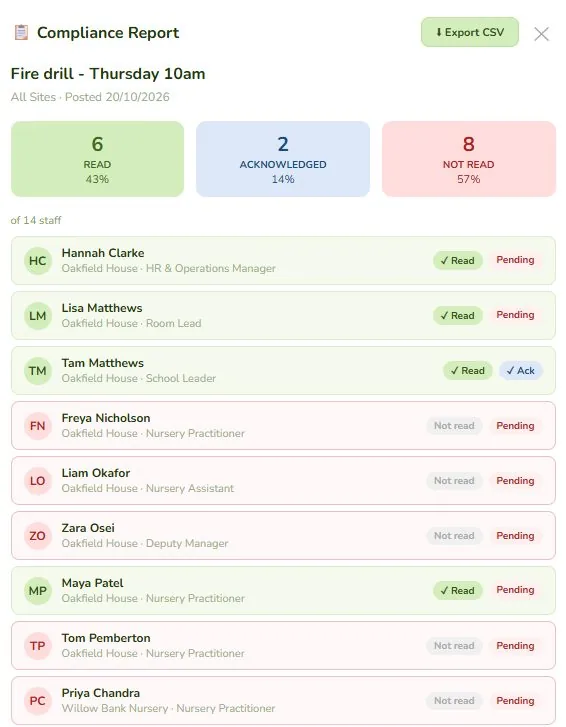
Notices staff actually see

The first thing staff see when they next open the app.

  • Post once — it's waiting on every phone
  • Read receipts show exactly who's seen it, not just who it was sent to
  • Track acknowledgement where you need it
Notice compliance report, showing read, acknowledged and not-read counts for every staff member

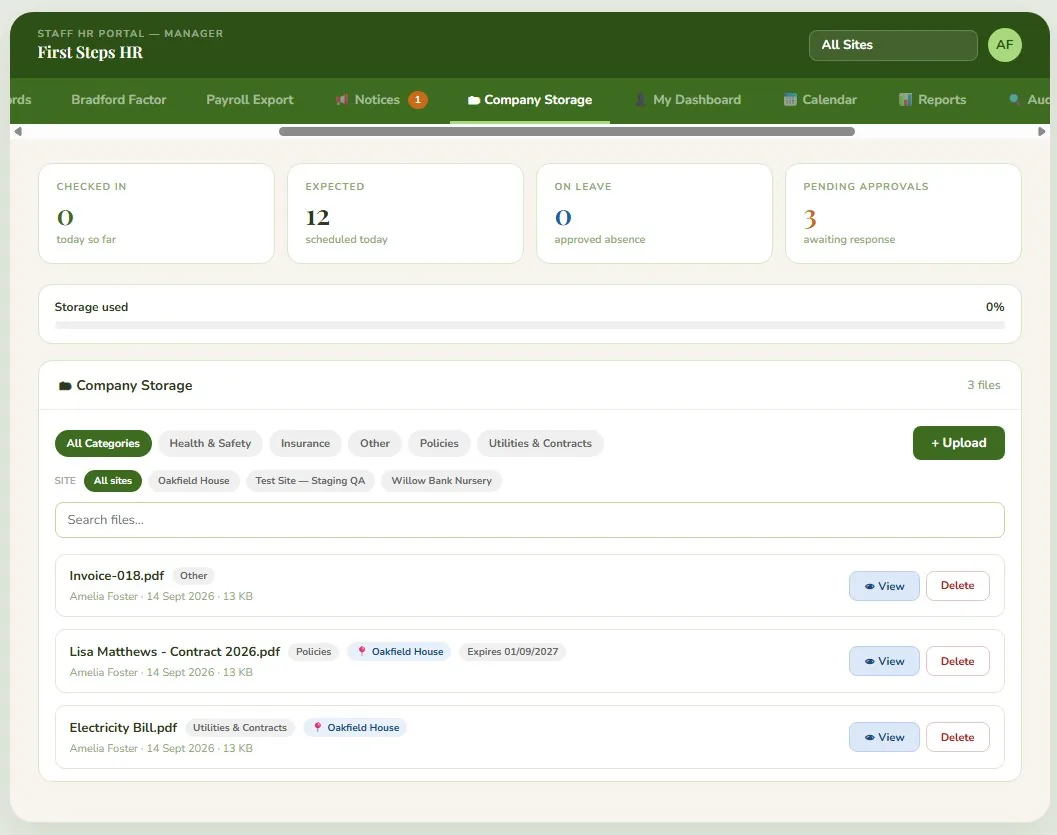
Every staff record and company document, digitised

Upload once, find it for good.

  • DBS certificates, qualifications, contracts, insurance, policies, utility bills
  • Tagged by category and site
  • No more filing cabinets, no more "who has the original?"
Company Storage screen, showing uploaded staff and company documents with category and site tags

One tap, on their own phone

  • No badge readers
  • No kiosk queue at the door
  • Check in and out from the phone already in their pocket
  • About two seconds, start to finish
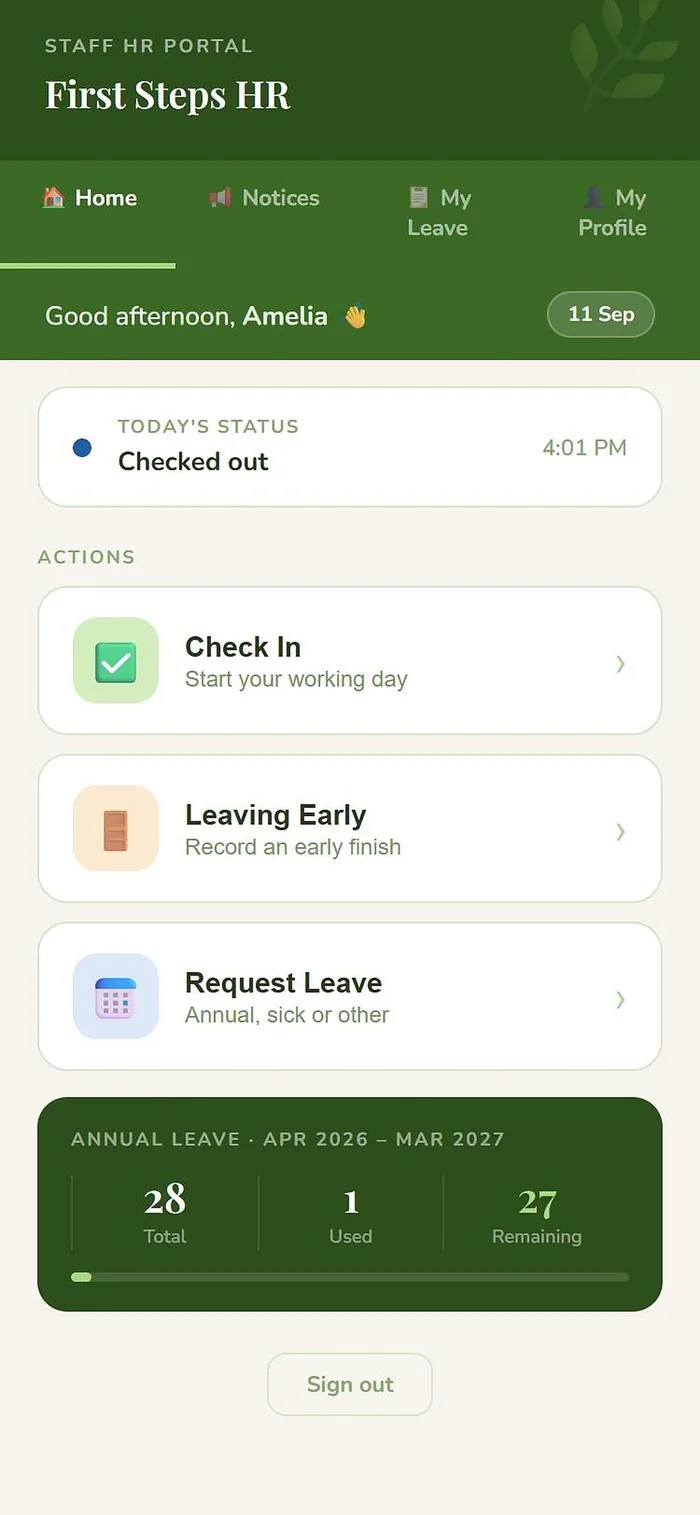
1. Open the app Staff mobile app home screen showing today's status as Checked out, with a Check In button

Today's status and one clear action — nothing to hunt for.

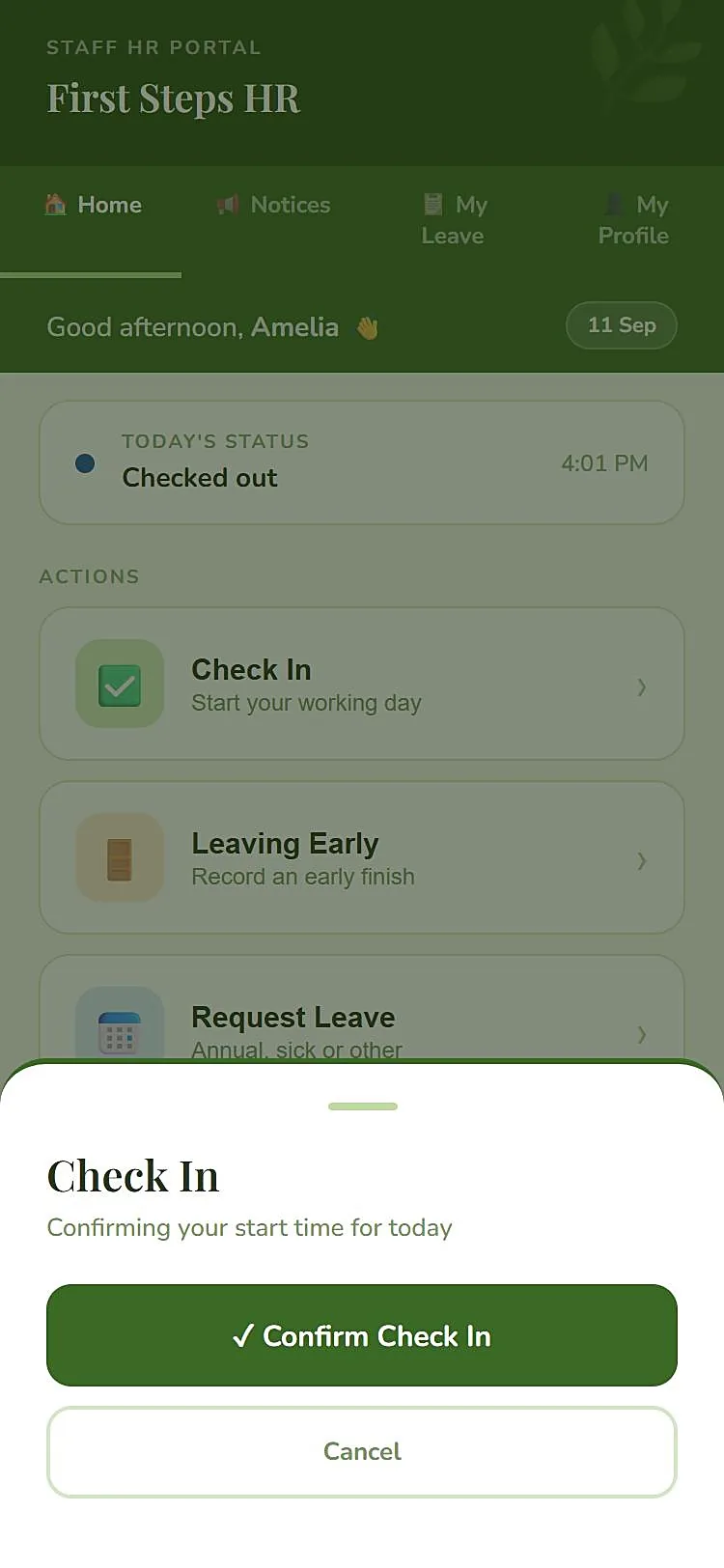
2. Confirm Staff mobile app Check In confirmation sheet, confirming the start time for today

One tap to confirm — no forms, no manager needed.

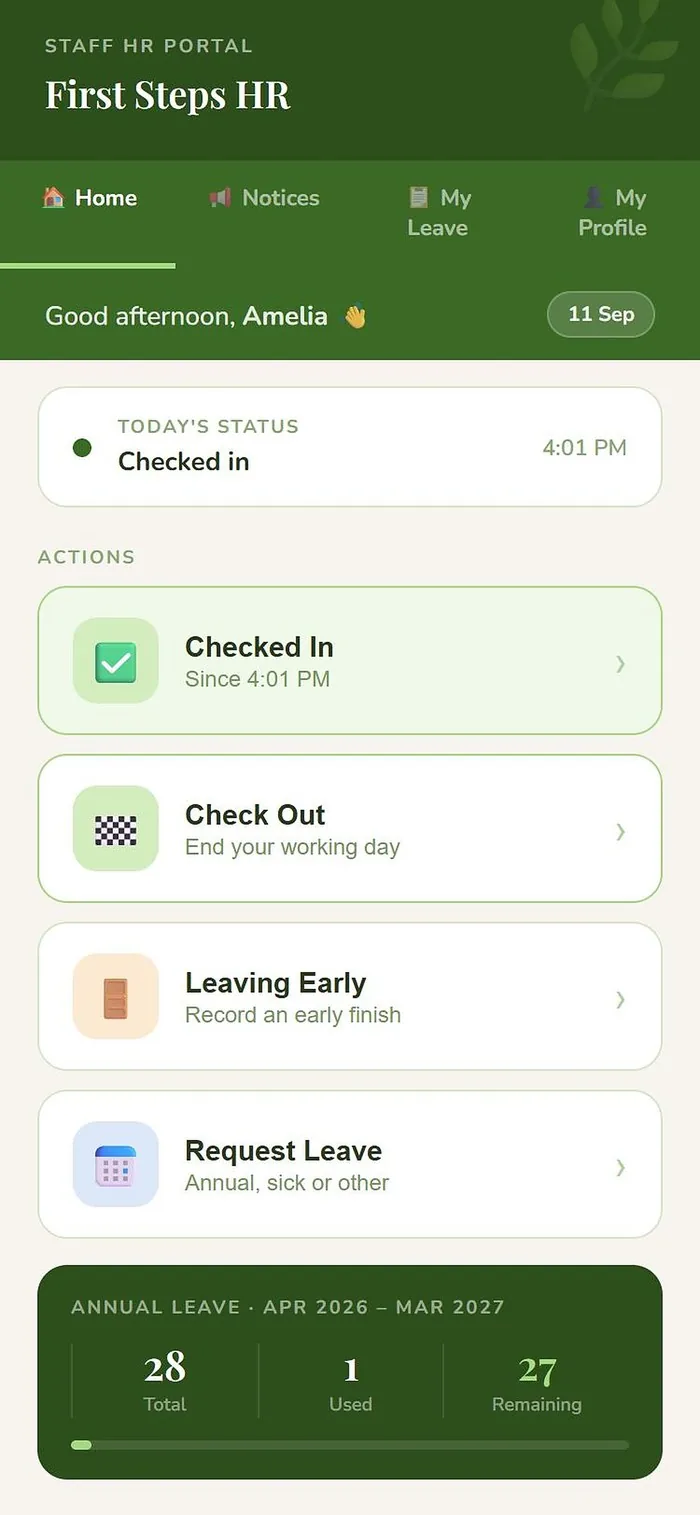
3. Done Staff mobile app home screen showing Checked in since 4:01 PM, with a Check Out button ready

Timestamped instantly — no paper, no group chat.

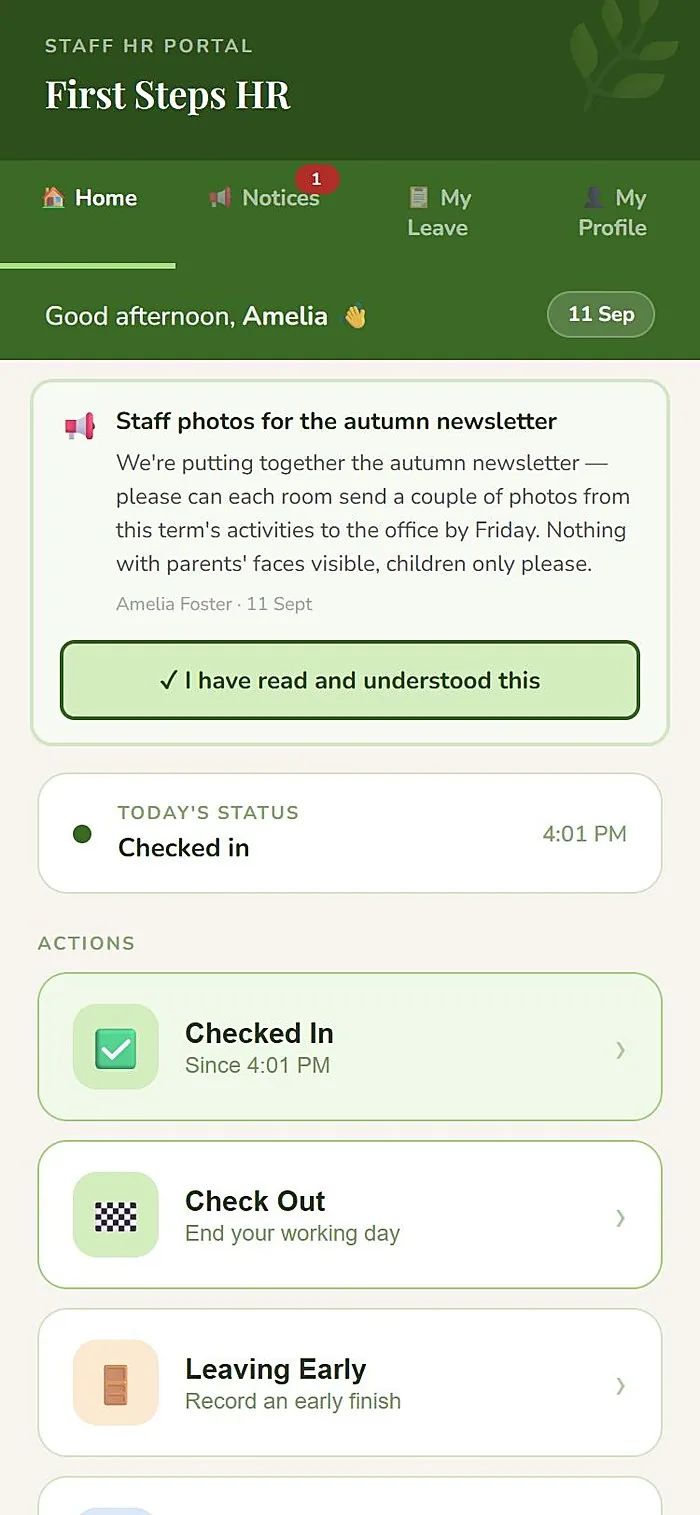
And notices, too Staff mobile app home screen showing a new notice from HR at the top, with a Notices badge showing 1 unread

Front and centre the moment they open the app — not buried in an inbox they don't check.

And everything else that comes with it

The parts that don't need a screenshot to explain, but save the most time.

Contracts & renewals

Issue contracts from your own templates, renew a whole team in bulk, and keep every version in each person's history.

Certificate & qualification tracking

DBS, first aid, safeguarding and CPD dates tracked automatically, with alerts before anything lapses.

Site compliance dashboard

Every site's attendance, closures and outstanding actions, visible at a glance from one screen.

Full audit log

Every change is recorded — who did what, and when. Visible to HR admins only.

Leave approvals

Requests and approvals in one flow, with email notifications so nothing sits waiting.

HR records

Supervision, disciplinary, performance and probation — each with its own access controls.

Return to work

A structured RTW interview is prompted automatically after any sick leave is approved.

Notices staff actually see

Push a notice out and it's the first thing staff see when they next open the app on their phone — read receipts show exactly who's seen it, not just who it was sent to.

Absence pattern tracking

Bradford Factor calculated automatically, flagging patterns before they become a problem.

Deputy & multi-site permissions

Managers see their site, HR sees everything, and deputy cover is time-boxed automatically.

Kiosk check-in

A shared tablet at reception for staff who don't carry their own device on site.

Holiday rollover

Entitlements carry over automatically at year end — no manual recalculation.

Secure by default

Automatic session timeouts, encrypted data throughout, and UK-only hosting.

Document storage

Contracts, policies, insurance and certificates, tagged by category and site, with alerts before anything lapses.

Not adapted for early years. Designed from it.

Every field and alert exists because a real nursery manager needed it.

Attendance, live

Staff check-in matched against each person's working pattern in real time — not reconstructed from yesterday's headcount on a whiteboard.

Term-time contracts

Handled as a first-class staff type, not a workaround bolted onto full-time logic.

Site closures

Ad-hoc and planned closures flagged clearly, with pay correctly unaffected either way.

Outdoor & forest settings

Built with a working forest preschool in mind from day one, not added as an edge case.

First Steps HR platform
Sunflower Nursery Own locked records
Bright Beginnings Own locked records
Little Explorers Own locked records

Your data is safe, and it's yours alone

Just for you

Your nursery's records are kept completely separate from every other nursery on First Steps HR. No one else can ever see your data, and you can never see theirs.

Kept in the UK, kept private

Everything is stored securely in UK data centres and protected so that only the right people can ever see it.

Never lost

Your data is automatically copied and saved every night, so it can always be brought back safely if anything ever goes wrong.

Simple, per-site pricing

One flat monthly fee per site, however many staff you run there — no per-seat charges to watch as your team grows. Every package includes secure document storage for staff records and company paperwork, so digitising your filing cabinet is never a separate add-on.

Sessional / Playgroup
£99/month

For a morning-only playgroup, pre-school or church-hall setting. Everything on this page, plus 5GB of secure document storage.

Book a demo
1 site
£150/month

For a single full-time nursery or preschool. No feature tier to upgrade into, 5GB of secure document storage included.

Book a demo
5–10 sites
£499/month

Established multi-site groups, with the same deputy cover and cross-site reporting as the tier below and 30GB of document storage.

Book a demo
10+ sites
Let's talk

Larger chains get a tailored rollout plan and pricing worked out on a call, not a fixed self-serve rate.

Book a call

All tiers include UK hosting, DBS & qualification tracking, leave management, secure document storage and payroll-ready exports, plus onboarding, training and support. Prices exclude VAT.

Need more storage?

Every plan includes a storage allowance for staff records and company documents, as shown above. If you need more, add a storage band to your account:

+10GB£15/month
+25GB£35/month
+50GB£60/month

Storage is the one part of the service that grows with use, because your files take up space in our UK data centres, so extra is charged separately and only if you need it. Prices exclude VAT.

You're not on your own

Onboarding, training and support are part of every plan. We don't sell it and disappear.

Set up with you

We help set up your sites and bring in your existing staff list, so you start with real data, not an empty system.

Training for your team

Training materials for managers and staff, plus virtual training sessions whenever you'd like them.

Help when you need it

Email support any time, and phone support Monday to Friday, 9am to 5pm.

Included in the price

No add-on, no extra charge for help. It's part of what you pay for each site.

Questions nurseries ask us

Straight answers. Anything else, ask on a demo.

How do staff check in and out?

On their own phone: they open the staff app, tap Check In and confirm. A site can also use a shared kiosk tablet at the door, with a personal PIN. For each site you can set a location radius, and choose to block check-ins from outside it.

How do staff log in?

Staff sign in with a secure First Steps HR login, protected by multi-factor authentication. If your staff already have Microsoft 365 or Google accounts, those can be used or set up as well, whichever suits your nursery.

Does it run our payroll?

No, and it doesn't try to. It produces a payroll-ready CSV for the month, covering hours, leave and sick days by member of staff, and flags statutory pay (SSP, SMP, SPP) cases for you to check. You carry on using your payroll provider or process, without re-keying hours.

Is it a childcare management system?

No. First Steps HR is for staff administration only: attendance, leave, contracts, DBS and qualification records, notices and reporting. It doesn't hold children's records.

How do contracts work?

Generate a contract or letter from your own templates, issue it to one person or a whole team in one go, and keep the full history of each person's contracts. Staff acknowledge their contract in the app and the date and time are recorded. Contracts are visible only to HR and the individual, and every time HR opens one, it is logged.

Where is our data, and who can see it?

Your records are stored in UK data centres, in a database that belongs to your nursery alone and is kept separate from every other customer. It is backed up automatically every night, and an audit log records who did what.

Can we bring our existing staff list?

Yes. We can import your current staff from a spreadsheet when we set you up, then invite everyone by email. We help with your first site, hands-on.

What help do we get getting started?

We help set up your sites, bring in your existing staff list and invite your team by email. You also get training materials for managers and staff, plus virtual training sessions if you'd like them. It's all included in the price.

What support is included?

Email support any time, and phone support Monday to Friday, 9am to 5pm. Support is included in every plan, and you're not left to work things out on your own.

Does it handle term-time and sessional staff?

Yes. Term-time contracts are a proper staff type, not a workaround, and there is a lower-priced tier for sessional settings and playgroups.

What if we need more storage?

Every plan includes a storage allowance. If you need more, you can add extra storage in simple bands: +10GB for £15 a month, +25GB for £35 or +50GB for £60. Storage is the one part of the service that grows with use, so extra is charged separately. Prices exclude VAT.

Is there a per-person charge?

No. Pricing is a flat monthly fee per site, however many staff work there, and secure document storage is included in every tier. Prices exclude VAT.

What happens if we ever leave?

You get a full export of your data. Your records are then kept for a 30-day grace period before they are deleted.

When can we start?

We're taking on early nurseries now for Q2 2027. Book a demo and we'll walk you through it and plan your setup with you.
See it running with your own setting in mind.

No sales script — a real walkthrough, and hands-on help setting up your first site.

By submitting this form you agree to be contacted about First Steps HR. See our Privacy Policy.

Book a demo